

Virtual Boy - Nintendo Classics (Questions)
Published on 20 Feb 2026
 Ce post existe en Français en cliquant sur ce texte.
I’ve talked about how Nintendo wants us to play, if you wanna read the review I made for the whole thing click here.
I know for a fact that a lot of you reading wants answers to play in other ways than Nintendo wants, and yes, I tried to look into everything that I could do, so I’ve made this into a series of common questions that I will answer, but I also wanted to put some attention to how to set it up properly as well.
How best to adjust the IPD (Interpupillary Distance)?
It is definitely more complicated than it sounds, because your brain will try to constantly correct the bad adjustment and make you think it’s okay. The problem is that if your brain constantly tries to correct this, that’s what will cause eye strain, a feel of unease or a headache after some time.
When you see the Virtual Boy logo screen when you start up a game, push and hold the Right Stick to go into IPD adjustment mode, and look at the middle of the screen and try to pay attention to the corners with the small VB squares. If they’re not vertically aligned, like a trapezoid then it’s not correct for your eyes, and you have to adjust. Try to make it vertically aligned, possibly try to set a bit too far to see your limits, and then select the average between the two noticeably bad adjustments.
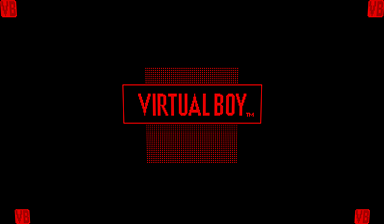
Bad Adjustment
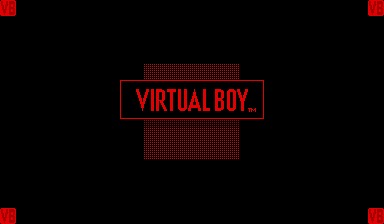
Good Adjustment
It might be best to remove the lens cover on the Virtual Boy replica to help you see the entire screen. You might still need to adjust anyway, you can try a game like 3-D TETRIS which really pushes the depth to some extent.
That said, some of the games have a depth option in the options, like 3-D TETRIS, GOLF, and RED ALARM, so feel free to mess around to make you feel more at ease as much as possible.
Can you use the Nintendo 64 controller as a substitute to the original Virtual Boy controller?
Yes, it is already mapped almost perfectly, but it is not natively supported by the app, so you might have to remap the Select button to something like the N64 stick through the app. You’ll have to press Z and ZR to access the app menus and rewind.
However you cannot adjust the IPD with it, there is no equivalent to pushing the Right Stick, and you cannot remap this controller on the Switch OS.
So I don’t know if you should actually use it, you might really need to still change the IPD until you find the sweet spot.
Can you use headphones?
Yes, but keep this in mind for those who wants to use wired headphones:
On the cardboard model, you do have a hole above the headphone jack port which would work for Switch 1 & 2. On the replica model, you don’t have any hole for it.
However you can use the headphone jack on your Switch 2 Pro Controller in this case.
Otherwise, you can use wireless Bluetooth headphones through the System Settings, it should work fine.
What is the best way to play?
Clearly, the Nintendo Switch - OLED Model has the upper advantage because of the lack of backlight on the screen itself as well as being a bit more zoomed in, it makes a huge difference compared to the rest, and the lack of screen backlight is particularly relevant to when you play on Cardboard, or play without the red filter on the Virtual Boy replica, especially once the screen coloring update comes.
But we should not undermine the red filter on the Virtual Boy replica that is actually doing a pretty good job erasing the backlight from the screen from the other models.
Can you play in any other color than red?
As of this moment I’m typing this, the app currently does not offer options to change the screen color.
However, there is a way to play in greyscale by using the System Settings option for it. It does actually work.
- On Switch 1: Go to System Settings -> System -> Change Display Colors, then set to Greyscale
- On Switch 2: Go to System Settings -> Accessibility -> Change Display Colors, then set to Greyscale
I do have to say though: on Switch OLED, because of the bigger screen, you can see relatively well the red, green and blue parts that makes each pixel light in this mode, but it still appears grey if you don’t pay too much attention.
Can you play in 2D to some extent on Virtual Boy - Nintendo Classics?
Not really… But there are no checks on the app to know if it’s inserted in some VR headset. However you cannot play docked at all, it will refuse to work.
If you’re fine playing with an extremely small 1:1 pixel view of the game on the screen or maybe a tiny bit bigger on Switch OLED or Switch 2 with the screen scaling, you can play I guess.
But I dunno if it’s worth messing with your eyes that much to see what’s on screen to play. The in-game screen is smaller than a Game Boy Advance screen, possibly smaller than a Game Boy Micro.
Can you use the Labo VR headset on Virtual Boy - Nintendo Classics?
Yes, it works just like the VB Cardboard Headset, except that the Switch 2 does not fit. It also works perfectly fine with the Switch OLED Model, which also makes for a larger screen.
One big difference though: The cardboard is larger than the Virtual Boy Cardboard, so you have less space for your hands on the Joy-Cons if they’re on the console itself.
Does the Virtual Boy Cardboard Headset work with Labo VR Compatible Games?
It’s pretty much acting the same as you would expect, except you won’t be able to use VR Toy-Cons for this.
However, because there is no IPD setting, this will make you feel bad if it’s not right. I had the luck to be able to play Labo VR with the Switch 1 just fine for long enough sessions, but on Switch 2, this is just wrong for me and it did make me feel nauseous.
If your eyes are perfectly set for it, then go for it, but else, this is not really your luck. Make sure the console is sitting right in the middle.
How does the Virtual Boy Replica work with Labo VR Compatible Games?
This is hit or miss. For games like Breath of the Wild, this works pretty perfectly. Same as the previous answer however, not having an IPD setting can be particularly problematic for long sessions, and you can have the same problems. You also have to remove what’s officially called the lens cover which contains the physical red filter on it so you can play in full color.
But then there’s the games that make heavy use of gyro, which can’t be helped it’s part of the point, but it means games like Super Mario Odyssey, Super Smash Bros. Ultimate, Captain Toad: Treasure Tracker are not quite playable for that reason, but on top of that, some games forces the use of Joy-Cons to be inserted on the sides of the console, making the accessory not really usable for Super Smash Bros. Ultimate and for certain parts of Nintendo Labo VR Kit, sometimes it works for some Garage made games, but sometimes it doesn’t.
Clearly this is made for use for the Virtual Boy - Nintendo Classics application and not much else.
Do you really need the official accessories to play Virtual Boy - Nintendo Classics in 3D?
I have not tested what I’m about to talk about:
There are third party headsets being sold for Switch 1 AND 2 on online stores like Amazon and more. I have however not the slightest clue if it works right for the application, but if they’re tested against Labo VR and compatible games, it should probably be fine as well.
Can you use the Nintendo Switch Lite to play Virtual Boy - Nintendo Classics in 3D?
No one really talks about this, but there are third party VR headsets for the Switch Lite as well that you can find in online stores.
I do not own a Switch Lite, and I don’t really intend to own one in the future, but I did want to let you know about that possibility.