
Virtual Boy - Nintendo Classics (Deep Dive Review)
Published on 20 Feb 2026
 Ce post existe en Français en cliquant sur ce texte.
Virtual Boy - Nintendo Classics and the accessories finally came out on Nintendo Switch 2 and Nintendo Switch, and as someone who never had used the original Virtual Boy in any capacity, I still want to try to make the (almost) ultimate review available on the Internet, hopefully.
For those who don’t know me: I am pretty much into Nintendo myself, I get interested into the obscure stuff, and I have played on almost everything they made, but never quite on Virtual Boy before. I do have some VR experience beyond Labo VR, I have played on PlayStation VR and some other old VR headsets before, but I don’t have any access to those anymore so I cannot compare with those, and anyway, Virtual Boy is not really quite about VR, and more into making stereoscopic 3D images.
So I want to talk about every aspect of this that I can from my point of view, from trying the app in almost every way possible with every console and accessories, the specifics of the emulator, the basics that you should be aware of before using, datamining and more.
I do need to do a warning however: I will REALLY go in detail about it. This is what I am here for.
If you want to see the questions, click here. I also go into detail on the setup process there.
The Accessories
So first, I want to bring some informations in the most clear cut way possible:
The Virtual Boy app AND the official accessories are compatible for BOTH Nintendo Switch 1 (except Lite, but look at the questions post about that) and Nintendo Switch 2.
I felt this was important to mention because many thought it was stuck to Nintendo Switch 2 despite how Nintendo has always been clear about it since its announcement in the Nintendo Direct. I always understood it was going to be available for both, but quite a few people still missed the memo so, there you go.
When it comes to the packaging: The Cardboard model just comes prebuilt, it’s actually smaller than the Labo VR headset, and it uses a stronger type of cardboard (you know, the kind that doesn’t feel fuzzy like on Nintendo Labo). Just keep in mind if you want to fit the Switch 1, push the pads on both sides at the black bottom to adjust the height (and pull back for Switch 2, of course). Other than that, it works just like the Labo VR headset, make sure to fit the console in the middle of the cardboard headset, and hold it by the controllers like a regular handheld system. That said those pads are kind of weird and too easy to be pushed when putting the Switch 1 in it, maybe I’m worried for nothing, but the process of fitting the console inside can feel a bit like you’re about to do something wrong.
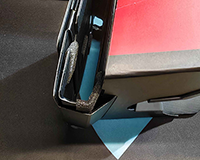
Switch 2 height
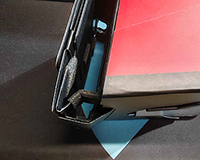
Switch 1 height
(Thanks to Akfamilyhome for the photos.)
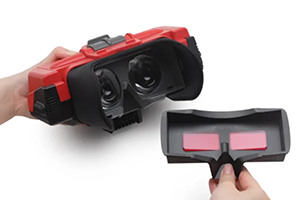
And the replica model is nicely fit into the packaging, and the instructions to build it are pretty clear, same deal for the attachment bracket to fit the Switch 1 and viceversa, you do need however a size 2 crosshead (Phillips) screwdriver for that.
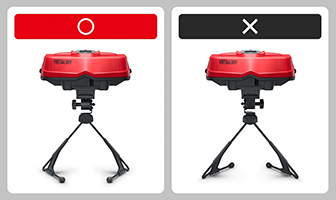
However, it does not mention the official orientation of the Virtual Boy stand, so just to clarify: The bottom tips of the stand need to face away from you. The stronger parts should be facing you. One other thing that doesn’t get mentioned much: You can change the vertical angle of the headset as well.
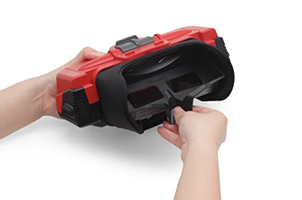
On the replica model, you can also find already inserted what’s officially called the lens cover which I guess does act as a cover to protect the lens, but also contains physical red filters to make a deeper red and erase the backlight of the screen, which is neat.
So for playing in full color (especially for the future color settings for the Virtual Boy app), you have no choice but to remove this by pulling it from the bottom, which can feel scary as the first time you do kinda need to pull it hard, and you can relatively easily put it back without a problem, don’t hesitate to push on the sides.
Basics
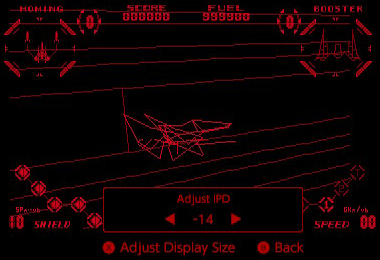
 The app starts with a warning that you need one of the accessories, a warning about how you have to regularly take pauses, and then a warning about the IPD setup. This is seriously important because not setting it up properly can actually make you feel uneasy after some time.
IPD stands for “Interpupillary Distance” which basically just means the distance between your left and right eye. The initial setup does actually make you set it up, but honestly, it’s a bit too based on feeling. You could set it wrong for your eyes because your brain will constantly try to trick you into thinking it’s okay, but we do need to avoid that. You can set the IPD at any time by pushing and holding into the Right Stick, which is good.
The app starts with a warning that you need one of the accessories, a warning about how you have to regularly take pauses, and then a warning about the IPD setup. This is seriously important because not setting it up properly can actually make you feel uneasy after some time.
IPD stands for “Interpupillary Distance” which basically just means the distance between your left and right eye. The initial setup does actually make you set it up, but honestly, it’s a bit too based on feeling. You could set it wrong for your eyes because your brain will constantly try to trick you into thinking it’s okay, but we do need to avoid that. You can set the IPD at any time by pushing and holding into the Right Stick, which is good.
Adjust IPD
Adjust Display Size
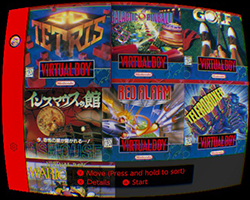
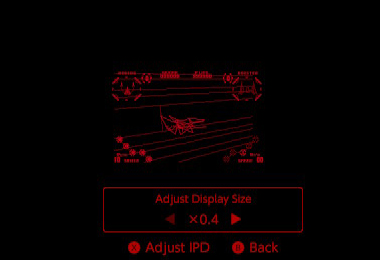
The menu is the same as every other Nintendo Classics app, in full color, selecting a game made me especially surprised: This is actually pixel perfect, no matter if you’re on Switch 1, OLED or Switch 2. I was actually worried about scaling since the announcement, but turns out there’s no scaling, we are just really seeing the LCD/OLED screen upclose with each pixel used in the same original resolution of the Virtual Boy. We do see the mesh of the screen itself, apparently the original Virtual Boy was even clearer according to people who could compare both, but honestly I think the screen mesh just kinda adds to the experience anyway. You can actually rescale up and down the game screen if you want, but it’s at the cost of pixel perfection.
The app contains every feature that you know of, like rewind, save states, and ability to view and remap controls, which since the Nintendo Classics rebrand update, does actually indicate what every button does per game, with sometimes some extra instructions if necessary. However as the red filter limits your view, the menu screen tends to be too big, forcing you to move your head a little bit to see all the information, especially for control remapping, but it’s not a bother when playing games, you won’t have to move for that.
Experience
I am sure I got the same experience as a lot of Virtual Boy users when using the Virtual Boy replica. As I don’t have the right kind of desk, I did get neck pain after some time playing, but eventually I somewhat found a good setup and stance to have to avoid it (turn your body instead of just your head), so it’s not so bad, but not everyone will have that luck. That all said, playing with the red filters on does make me instinctively not look at the lens directly but a slight bit below, enough to actually affect the clarity of the image, so keep in mind to actually seat yourself properly to look better at the screen, not to mention that the red filters does reduce the view to some extent, but it’s not a big deal.
Playing on the Cardboard headset is essentially putting the problem elsewhere: Your arms or perhaps your hands. It hurts depending on your stance, though resting my elbows on the sides of my chair did work out pretty well for me, but I do prefer using a regular controller for this. The Cardboard being lightweight and small does make things easier in some aspects, like just being on your bed, keeping the Cardboard resting on your face, and then play with a controller seperate from the system. It does work just fine and it is pretty cool to play that way.
If you ever wondered if I had some sort of unease sensation or headaches from this, I had some when I didn’t set the IPD properly at first, but after that, I never really thought about it. The screen never felt like my eyes were going to be strained, it’s never that bright at the highest screen brightness, the red color is playing a huge role in preventing that as well. This is where the Switch - OLED Model definitely shines here, the lack of screen backlight and the bigger screen does really sell the experience better when you’re playing without any red filter.
In the meantime that the application gets the screen color feature, you can actually play in greyscale by setting the display color on the System Settings.
It didn’t cause any problems with my eyes, but on the Switch OLED Model, because of the bigger screen, you can make out the parts of a pixel OLED, it is not a huge bother, but maybe it could be for you. On original Switch 1 & 2 however, I couldn’t really tell, it just appeared grey to me.
The emulation itself is seemingly good. I heard that it is unfortunately adapting 50 Hz (original) into 60 Hz no matter what, no Variable Refresh Rate to be seen on Switch 2, but it honestly never bothered me that much. I heard from a Virtual Boy emulator developer that this emulator is seemingly more accurate than any other Virtual Boy emulator yet, not perfect, but very much trying.
Why Virtual Boy Virtual Console Never Happened On 3DS
Speaking of, let’s compare with Red Viper, the Virtual Boy emulator for the Nintendo 3DS. I want to say one thing: It’s very good that it finally exists after so long, it seemed like so much of an obvious idea but it took time to finally happen, and it’s really great!
But I noticed that playing it in 3D on the 3DS screen was always off in some games. In fact sometimes the 3D effect was so extreme in some games, it instantly strains my eyes, despite all my attempts to configure the 3D. Sometimes the 3D was just feeling off and I couldn’t really find a good setting either.
That has to do with how the Virtual Boy 3D and the 3DS 3D has nothing to do with each other. When you set the 3D slider on a native 3DS game, what actually happens is that the IPD of the in-game camera changes and affects the rendered in-game 3D graphics for both eyes. However, the Virtual Boy does not have this concept, and the left and right eye images are always the same no matter what. The IPD adjustment on the actual device is just purely to move the physical left and right screens for your eyes, it does not change how the game displays on them.
It results that the Virtual Boy is doing a 3D effect that is quite frankly not made in mind for the 3DS, and that is probably why Virtual Boy Virtual Console never happened. I do however insist that some games are totally playable that way, especially if the game offers a depth setting in the options, just that it’s more complicated.
I also want to mention that the controls are not necessarily the best on 3DS, particularly for games that makes use of every button, but to be honest, ABXY also doesn’t make a great substitute in feeling for the right D-pad when it’s relevant, like for Teleroboxer.
You could probably say the fans should just modify the games to adapt for 3DS, but guess what? I asked the relevant people about that.
It might honestly just be easier to remake the games for 3DS instead of hacking the games. We’re talking about changes that requires to redraw graphics entirely and possibly a lot of reprogramming to handle this kind of stuff. Is it worth doing that kind of effort compared to just remaking games?
Why No 2D Mode?
This is on the minds of many. Why did Nintendo not add a 2D Mode? After all, they have shown them in 2D!
Just as an aside, if you somehow feel that showing them in 2D is an act of false advertising, despite how Nintendo insisted from the start that you need the accessory to play, I don’t know what to tell you. It’s like saying that magazines that showed Virtual Boy screenshots in 2D were lying to everyone, I just think you should use your brain better.
Going back to the topic at hand, I can say that most games are definitely playable in 2D to some extent, but after spending a lot of time on them, I do understand better why Nintendo just doesn’t offer a 2D mode.
If you only spent time emulating Wario Land or some of the other games and basically playing for 5 minutes, you will not understand. You’d feel the games don’t really sell the point of the 3D of the Virtual Boy, and you’d be correct, I do agree.
But when the game does truly make use of the 3D effect for gameplay reasons, which happens a bit more than you would think should you spend more than 5 minutes on those games, this is not really easily playable in 2D, especially when the screen is only monochrome, making judgement of depth even harder.
For some of those games that seem fine in 2D, I’d still recommend you to play in 3D instead because playing in 2D is nothing more than playing with only one eye. Only one of the screens is shown, which also shows a bias of the perspective being on either eye, as in the center is actually skewed in one direction instead of being at the center of the screen, and it can absolutely be annoying in some games, personally I had huge problems playing Mario Clash in 2D just because of the perspective being biased in one way.
I do think they should have added at least a selection of games in 2D, but at the same time, you will definitely have random moments where you might misjudge the perspective, or outright have confusion. But honestly, this thing is basically just for the curious and super fans like me, this is an exotic thing, and if you feel forced, frankly, just go touch grass and calm down. You won’t feel particularly enlightened playing Virtual Boy Wario Land or Red Alarm, but don’t pretend you can’t spend $25 buying a third-party plastic headset for your Switch 2 or to just download an emulator if you’re unhappy with Nintendo’s offering. You can live without.
And as I said before, hacking games to be played better in 2D wouldn’t be this easy either, please don’t confuse a lot of things that are going on with game modding, recompilation, decompilation and more, don’t overestimate this stuff either. Fans do a lot, but they don’t do everything. I could go on and on about this as a developer, but I don’t wanna waste time on what is supposed to be a review of Virtual Boy - Nintendo Classics.
Games
Let’s be honest here, I’m not here to diss the Virtual Boy games by default, but to be warned to the uninitiated: If you don’t like arcade style games, you will not play many games on this. I do have a real appreciation for simple arcade games, so a lot of these are actual games that I can spend hours into in total, but if your appreciation of games aren’t quite on the pure gameplay aspect, and more on being on a certain vibe and maybe a sense of adventure, I will be honest, this is probably not for you in any way.
These are my impressions of each game, I have not necessarily finished them or necessarily understood every aspect, but I spent a lot of time in them, including reading the original manual if need be.
3-D TETRIS
Not really the best game to be honest. The depth can be straining if you don’t set it properly (you can set it up inside the game’s main menu), the framerate is really low and you can somewhat confuse the directions as you can actually just rotate the pieces in every way possible in 3D. There are different modes to play, each with different rules.
- 3-D Tetris mode: Exactly what you think it is, Type A is the usual infinite until you die, Clear It! is a stage mode where you just clear the layers (called units on the top left of the screen) to get to the next stage.
- Center-Fill mode: Place blocks symmetrically around the center square, and you can clear it by having a block in the center to confirm. It definitely seems less intuitive overall, but it does deal with every single kind of symmetry you can think of.
- Puzzle mode: You see the completed result first, and then you try to redo that shape with the blocks that are given to you, which you can see in advance.
Puzzle mode is clearly the one mode that I prefer overall, the rest doesn’t feel too great to play to me. The final animations when you complete a puzzle are pretty cool.
If you can get the actual manual (it’s pretty easy to find), it can make the game easier to understand, especially for Center-Fill.
Galactic Pinball
Honestly one of the hardest Pinball games I’ve played, partially because of the physics not being quite as good as other pinball games. The tables are actually varied, but getting 1st on the leaderboards for each is definitely asking a lot, but I guess that’s the point of the challenge.
There are some bonus games going on which makes me feel it’s actually best played in 3D than 2D for those moments, it’s not the most impressive thing you’ll play, but the 3D effect certainly works. I’ll definitely come back to this from time to time, especially since Nintendo Switch Online currently doesn’t have a lot of pinball games.
The Mansion of Innsmouth
Actually pretty underrated, there is no japanese text in this to worry about, this is really just pure gameplay. This is basically a simpler “survival horror” mansion crawling, where you look for a key and then find the exit to finish the level within a limited time, you can find two orbs which are actually to either reveal the full map or reveal the locations of items, and you have a gun with limited ammo, so you have to be careful to not waste shots.
This has actually 4 endings, and your path to one of the endings is defined by how long it took you to finish each level, and it’s actually pretty cool and easy to finish as you regularly get passwords, and when you get a Game Over, the password menu already has the password of the level you died on.
RED ALARM
You could treat it as kind of like the Star Fox of the Virtual Boy, but it’s not actually a full on rail shooter, where you do go through stages of linear paths and then ends with a boss arena, but you can relatively play at your own pace (watch out the fuel), you can set the speed and even go backwards if you want, your ship can even strafe with the right stick, it’s fairly intuitive actually and pretty fun to play. It does get harder pretty quick, but that’s to be expected when the game is just 6 stages long, it’s definitely more arcade in nature and clearly made for you to just replay and get better at it.
This game requires 3D, this is absolutely not playable in 2D because of the wireframe 3D, else you just don’t see the depth very well, and it does pretty creative uses of it too, it gets particularly interesting when you go inside a cave, underwater or a temple, where you do recognize the environment pretty well with animated waterfalls, algaes, bricks, and more. The enemies are particularly varied too. That all said, sometimes it is hard to understand where you need to go at times, but it’s not really because of the 3D, I can see obstacles in front of me very well, but it’s more about how to see where you can go to continue the level.
Don’t forget to use the L button to turn faster!
Teleroboxer
This is clearly the equivalent to Punch Out, but with way more complex moves because of the use of both sticks and L & R buttons. You manage each hand, and checking the controls inside the app will definitely make your head spin at first, and this game is really HARD. It is hard to get used to, you will definitely suffer through this, but it’s all the more satisfying to manage to beat one of the robot opponents.
If you want maybe another way to have intuitive controls, modify the controls and swap Right and Down on the Left Stick, and Left and Down on the Right Stick, so that pushing the stick down will make you defend against lower punches. It definitely helped for me, just keep in mind all the kinds of punches that you can make, and that everything is about timing.
Virtual Boy Wario Land
Wario Land has always been known to be experimental to some extent, this one is no exception. While it has some of the DNA of the first Wario Land on Game Boy, this one handles levels differently: you’re going from the bottom to the surface, and all levels are linked to each other with an elevator, with an exploration focused goal, with secrets to find as you go back up. This does not have as many levels, but it really doesn’t have to be more.
The controls are a bit more unusual by having a Run button on the shoulder buttons, but otherwise it’s the Wario we knew from the first Wario Land but better. The game does have the reputation it deserves of being the best game on the system, but I do think it’s kind of unfair to the rest of them just because it’s a game that has more of an adventure feel overall.
GOLF
Old Golf games don’t necessarily get most of my attention to be honest, especially since you have to constantly just get a feel for the physics of the game and it’s not really always the same between games, and without a lot of the quality of life options in games like Everybody’s Golf and Mario Golf, it is pretty hard to get used to.
It does have some form of shaded 3D polygons which is rare, and the 3D effect is to me not as impactful as other games, it’s not particularly hard to play, you just need to get a feel for itself, which for me is the hardest part.
But let’s be honest, there are way better Golf games to play if you have the Nintendo Switch Online + Expansion Pack subscription.
Problems
There are a few problems I want to talk about, but overall, they’re pretty minor.
- When you play in VR mode, the Switch (2) OS notifications and menus are particularly distracting because they don’t take into account the IPD and really messes with the 3D, and they are extremely bothersome.
- Tip: Holding HOME button in VR mode allows you to set the screen brightness and sound volume.
- As I mentioned, the IPD setup process is too much based on feeling, and maybe there should be better and more reliable instructions, but at least they do the best of their abilities to remind people of this feature.
- You can’t really put the system to sleep mode and turn it back on directly to the VB app, you have to remove the system first every time to press the Close button in the middle of the screen.
- Screenshots are bad, it could have gained to automatically upres the in-game screen, I’d love to show off some stuff.
- On Switch 1, you can still relatively show off nearly pixel perfect screenshots (JPEG compression artifacts really don’t help here) if you bother to zoom on them.
- However, on Switch 2 specifically it is really bad. It scales down from 1080p to 720p and it’s particularly bad.
- There’s no Virtual Boy controller reproduction, that’s sad.
- The Nintendo 64 controller is not natively supported. It does work pretty much perfectly and acts as a good substitute, but it would be handy to use the Z button for games, and have the ability to set the IPD in alternate ways than clicking and holding the Right Stick.
- The lack of 2D mode. It’s still sad that there’s no option for that.
- A bunch of the games range from actually unplayable in 2D like RED ALARM, to best played in 3D like Mario Clash even if in 2D it still mostly works, so I’d want at least a selection of games at minimum.
Datamine
I’d love to say there’s a lot to mention, but would it surprise you if I told you that Nintendo is plenty aware of people like me looking inside the application?
The application works just like the rest, with only the bare minimum needed.
The ROMs are not really new compared to what you’d find on the Internet, they’re just raw ROM data.
Japan got the US ROM of 3-D TETRIS as is, and the rest of the world got the Japanese ROM of The Mansion of Innsmouth as is as well.
Conclusion
Overall, from a person like me who hasn’t played the original Virtual Boy before, this seems like the best way to play them without using the original device. Nintendo did a decent job to reproduce the experience as it was, with all the good and the bad that comes with it. It’s sad however that there is no reproduction of the original Virtual Boy controller, but it’s okay.
Would I recommend it? Honestly, that depends on your interests, if you’re fine playing smaller scale games that have more of an arcade feel with additional constraints but that you get decent 3D effects in return, I’d recommend it better than playing on 3DS, personally. You don’t have to spend $100 for the full replica, the Cardboard model for $25 still does a decent job too and both accessories work for both Switch 1 & 2, and there are third party options that are just as cheap, including for the unsupported Switch Lite.
But if you’re not interested in that kind of games, I don’t know if I would tell you to indulge into this curiosity. You’re not necessarily missing THAT much. The games do use the 3D, but it’s not necessarily the best use of 3D you’ll ever see in your life. I’m just part of the bunch of weirdos who loves game history who can get excited to try that sort of thing.
I’m not suddenly saying to rehabilitate the Virtual Boy, in 1995 I sure wouldn’t have recommended to get it, in fact I still don’t, it was probably too expensive for what it was, probably too much to play what are essentially just bigger Game Boy games with a 3D effect in full red, except if you get it for a real bargain later in its dead life. But I would definitely rehabilitate its games nowadays, we’re in different times and we can try to appreciate all games for what they are outside of its original context, and I do stand that playing them as close to originally intended with a proper 3D screen to peek into is at least something that does make me appreciate them more. The exotic aspect is probably helping a lot, too.
I hope to see the extra games soon enough, as well as the screen color feature so we don’t have to rely on a System Settings feature, and I am certainly holding interest for Zero Racers and D-HOPPER, both showing a lot of promise. I wish Bound High! would be added to this, it’s seriously a good game among the unreleased Virtual Boy games.
I have focused on the main use of the accessories being the app for this review, but if you have a ton of questions about all the other ways to use it or what to do with it, you can find by clicking here a series of questions and answers.